End-to-end product photography automation connects four stages - capture, processing, structuring, and publishing - into one system. Your real product moves from studio to shelf without getting stuck between tools. This is different from a generic content production process. Every image starts from a real product, not a generated one.
This matters whether you are running an e-commerce catalog of 5,000 SKUs or documenting industrial parts for a technical catalog. The stakes differ - one team optimizes for speed to market, the other for audit-grade consistency. But the workflow is the same four stages.
Most product photography workflows break down at the connections between these stages, not inside any one of them. Here is what each stage actually looks like.
Product photography automation protects content quality while you scale. Teams that manage the process in-house avoid the back-and-forth with external vendors - but only if every stage works together as one system.
- End-to-end automation connects four stages: capture, process, structure, publish.
- Automating a single stage still leaves manual handoffs between stages.
- E-commerce catalogs gain speed to market. Industrial and manufacturing catalogs gain audit-grade documentation.
- Structuring turns images into product data other systems can actually use.
- A connected system removes the manual re-uploading and re-checking that eats time between tools.
End-to-end product photography automation is a connected workflow. It takes a real product from capture through processing, gathering data, and publishing - with no manual handoffs between stages.
That is different from automating a single stage, which is what most tools still do. A workflow only counts as end-to-end when every stage hands off to the next automatically. Product content creation platforms that generate or synthesize imagery skip this problem by skipping the product itself. Automated photography does not.
This gap shows up in fragmented setups. Hardware vendors automate the camera and lighting. Software vendors automate editing and file management. Most systems are built to own one part of the line, not all of it.
The result: your team still spends time re-uploading, renaming, and re-checking files between tools. That is the real cost of a workflow that is automated in pieces, not as a whole.
Capture is where consistency either gets built in or gets lost. Manual setups let lighting and positioning drift from shot to shot, so images do not quite match across the catalog.
Consistent capture sets the ceiling for everything that follows. Processing and structuring can only work with what capture gives them. Professional photographers can hit that standard shot by shot, but doing it manually across a growing catalog is hard to sustain.
AI Photo Assistant removes that variation. It sets up lighting for a specific product type, so every shot starts from the same calibrated baseline. The result: a studio that can process up to 200 products a day, without asking an operator to relearn the setup for every item. That is production-pace capture, not a one-off studio session.
Repeatable processes matter most when materials vary. A studio built for consistent capture handles soft-shell gloves, reflective jewelry, and matte-finish parts the same way. A glove and a ring need different lighting, but the same repeatable process behind them.
Clear user guides make this work across a whole team - so any operator can produce the same result, not just one trained specialist.
For e-commerce teams, this stage is about throughput: getting new SKUs photographed fast enough to match launch schedules. For industrial and manufacturing teams, it is about repeatability: every machined part, fastener, or component documented the same way, every time, so the images hold up under quality review.
In short: consistent capture is the foundation every later stage depends on.
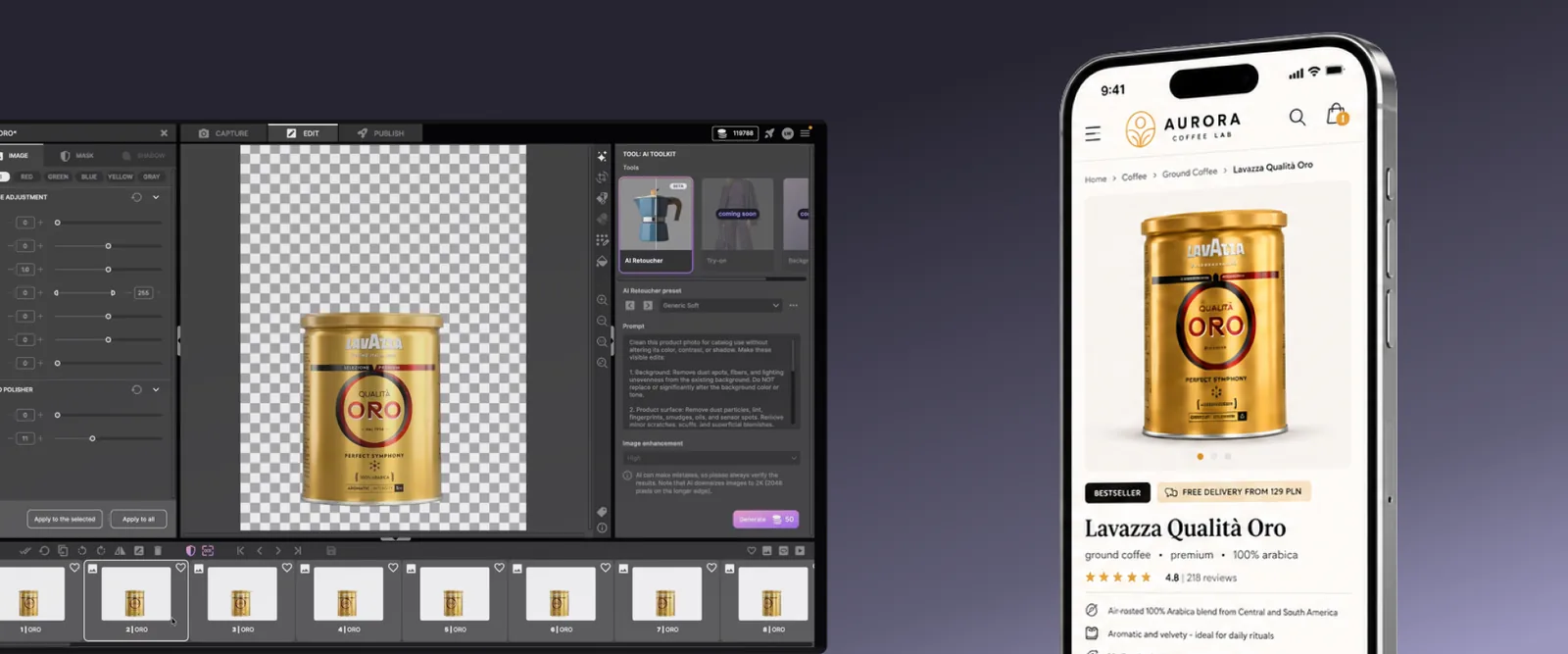
Processing is where a non-edited photo becomes a usable asset. Background removal, color correction, and retouching all happen here. This is usually the stage where manual work piles up fastest, since every image needs the same set of corrections applied by hand.
AI Masking and IQ Mask 2.0 handle instant background removal. AI Retoucher enhances images while keeping the product real. Neither tool replaces judgment - the final choice on what ships is still yours - but both remove repetitive manual work.
These are named features doing a specific job, not a vague AI label bolted onto the workflow. For products that need a clean white background and consistent quality across every angle, catching corrections here means one pass instead of two. This is not AI content creation in the generative sense. Each AI role works from your actual product photo, not a synthesized one.
Formalizing this stage pays off. The gain compounds because every rule you set up once applies to every product that follows it. This is one of the clearest signs a workflow has moved from manual to automated: the same correction no longer needs to be applied by hand, image after image.
This stage also shapes rich media. A pure white background on every product photo keeps images ready for marketplaces that require it - without sacrificing texture, color, or true-to-reality proportions. Clean captures here protect content quality down the line, since every image already shows the product clearly from every angle. That makes product descriptions easier to write later.
In short: processing is where consistency gets enforced automatically, image by image. It is also where teams save time fastest, since one correction rule applies to the whole batch.
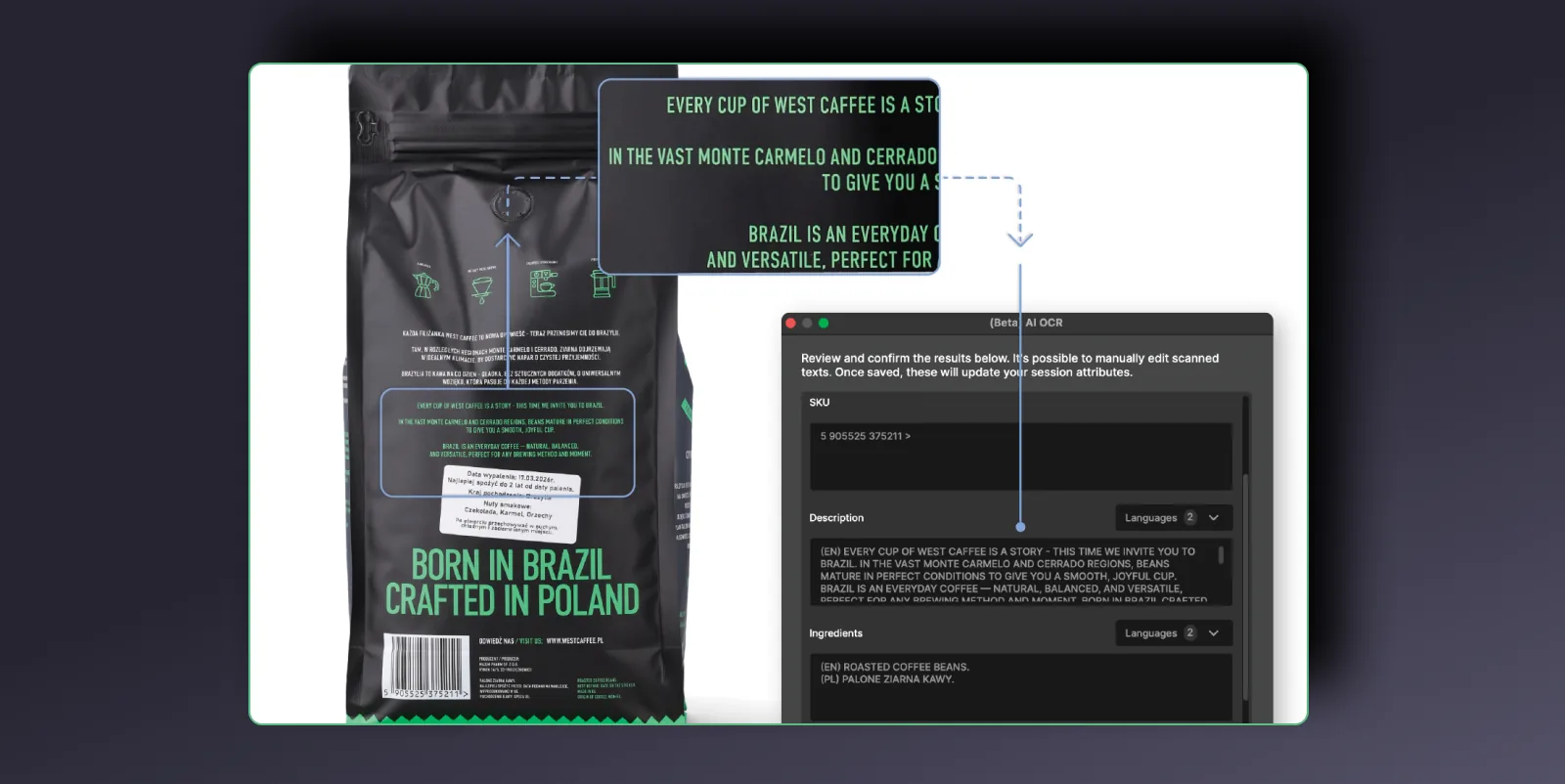
Structuring connects every image to structured product data - SKUs, serial numbers, specs - so it can be searched, audited, and routed automatically. It's often the stage that gets the least attention, and it's where a broken workflow costs you the most, later.
An image without structured metadata is just a file. An image linked to a SKU, a serial number, or a set of extracted product specs is data your other systems can actually use.
AI OCR extracts data straight from the product or its packaging: part numbers, labels, dimensions, weight. It structures that data automatically. That's the difference between a folder of pictures and master product data - searchable, auditable, ready to route into a PIM (product information management) or DAM (digital asset management), without extra manual entry.
This is also where digital asset management earns its keep. Keep product data, structure, and metadata in one system, and your assets stay easy to find months later - not just on the day you shot them. Every image, spec sheet, and file lands where your team expects it, ready to feed a DAM or PIM without a manual search.
This stage matters most for industrial and manufacturing catalogs. Link every photographed component to its serial number and specification, and you get an audit-grade record for quality control and compliance - not just a marketing image. For e-commerce catalogs, the same structuring discipline keeps a 5,000-SKU catalog consistent across every marketplace it reaches.
Stage 4: Publish - how does content get where it needs to go?
Publishing sends approved images, specs, and metadata out to every channel that needs them. It should be the easiest stage - and in a connected workflow, it is.
Images, specs, and metadata move to your e-commerce platform, DAM, or PIM automatically, formatted for whatever each channel requires. That is the payoff of building the earlier stages correctly: product images captured, processed, and tagged consistently need no last-minute fixing before they ship. Web-ready assets reach every channel without a separate export step for each one.
This is where the file-hunting and re-checking tends to resurface. Every manual export, resize, and re-upload is a chance for a version to fall out of sync.
One connected system means one place where content gets approved, and one place it gets distributed from - not three tools that each hold a different version of the truth.
Content delivery works the same way for every channel, whether the file is a still image or a video. The same captured image can become a still for product pages, a branded video for social, or a formatted export for a specific e-commerce site. The right content reaches the right channel without a separate edit for each one.
The same asset moves cleanly across sales channels and e-commerce channels alike, so your team can sell the same real product everywhere it appears.
Rich content builds product pages customers actually browse. It gives them more detail before they buy, and a reason to trust what they see across platforms. Clear, structured product data also helps your content show up in search results, since AI answer engines favor pages built this way over a single generic photo.
| Stage | E-commerce focus | Industrial / manufacturing focus |
|---|
| Capture | Speed to catalog for new SKUs | Repeatable documentation of parts and components |
| Process | Consistent, marketplace-ready images | Accurate, distortion-free technical imagery |
| Structure | Catalog consistency across platforms | Audit-grade records linked to serial numbers |
| Publish | Fast, multi-channel distribution | Structured routing into ERP, PLM, or PIM systems |
Most teams do not build a broken workflow on purpose. It happens gradually: a camera rig here, an editing subscription there, a DAM added later to manage the mess.
Each tool solves its own problem well. None of them talk to each other. That is how most product photography workflows end up fragmented - not from a bad decision, but from a series of reasonable ones made without a shared system in mind.
A connected system removes that friction. Capture, processing, structuring, and publishing share the same data from the start. That is the difference between stitching fragmented people and tools together, and running one repeatable system your whole catalog moves through. Generic content creation tools can edit an image after the fact, but they cannot fix inconsistent capture upstream.
The payoff shows up in real numbers. Orbitvu customers running a connected workflow produce more content per shoot, in less time. One Orbitvu Fashion Studio customer, Carrafina Private Label, reports shooting 3x more content than a regular photoshoot.
Those gains do not come from any single stage moving faster. They come from removing the handoffs between stages entirely. Creating content this way - stage by stage, without gaps - is what makes the workflow scale.
Most people assume automating one stage is enough. It rarely is. A single tool for editing, another for file management, and a third for content creation can each work well on their own - but no one person ends up responsible for the handoffs between them. That gap is what wastes time later.
Teams that manage all four stages as one system report better productivity, faster access to their own images and data, and a clearer path from studio to shelf. The point is simple: software that only automates one stage is not the same as a system built to manage the whole workflow.